Compose

1. 盒子布局

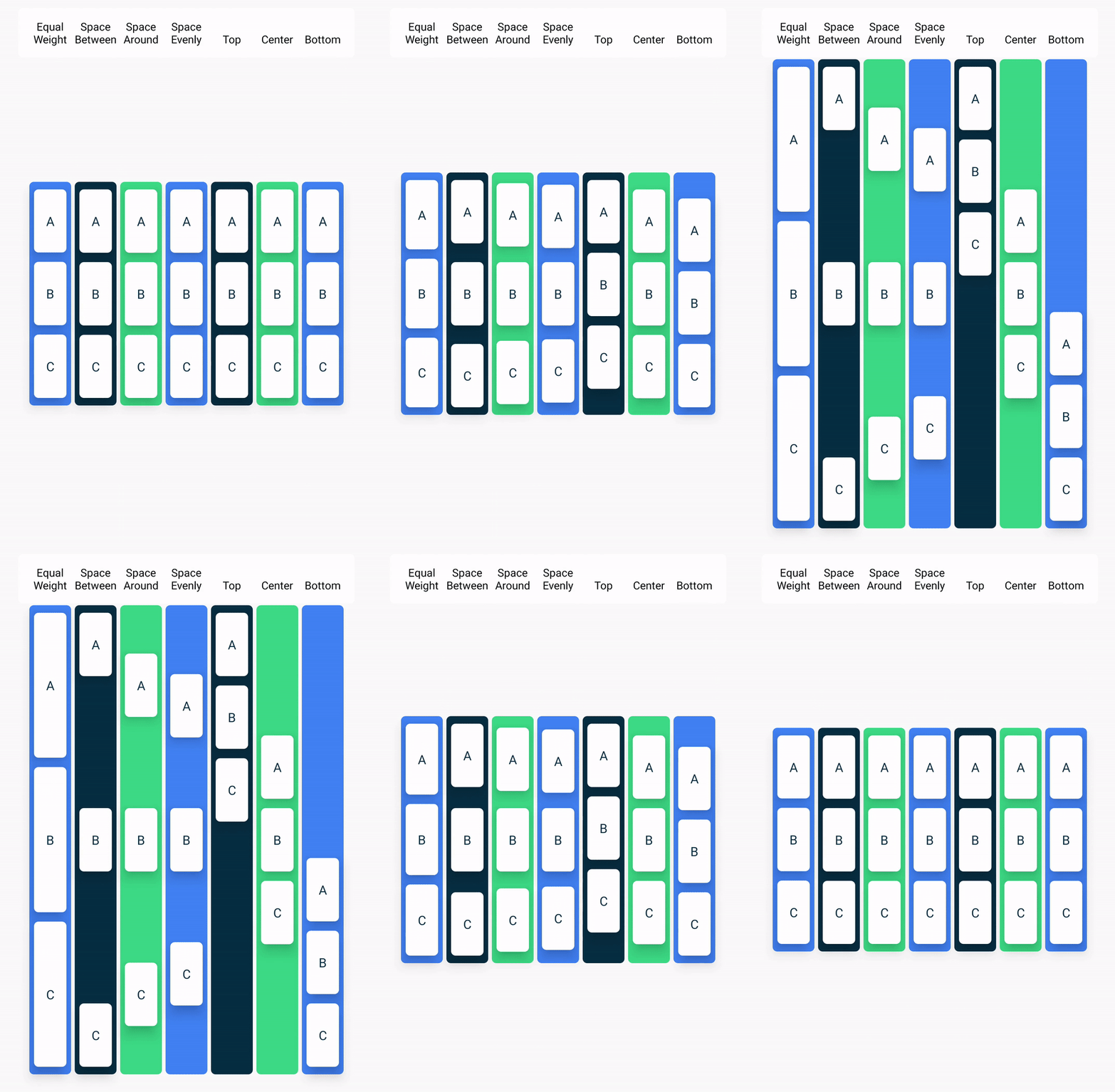
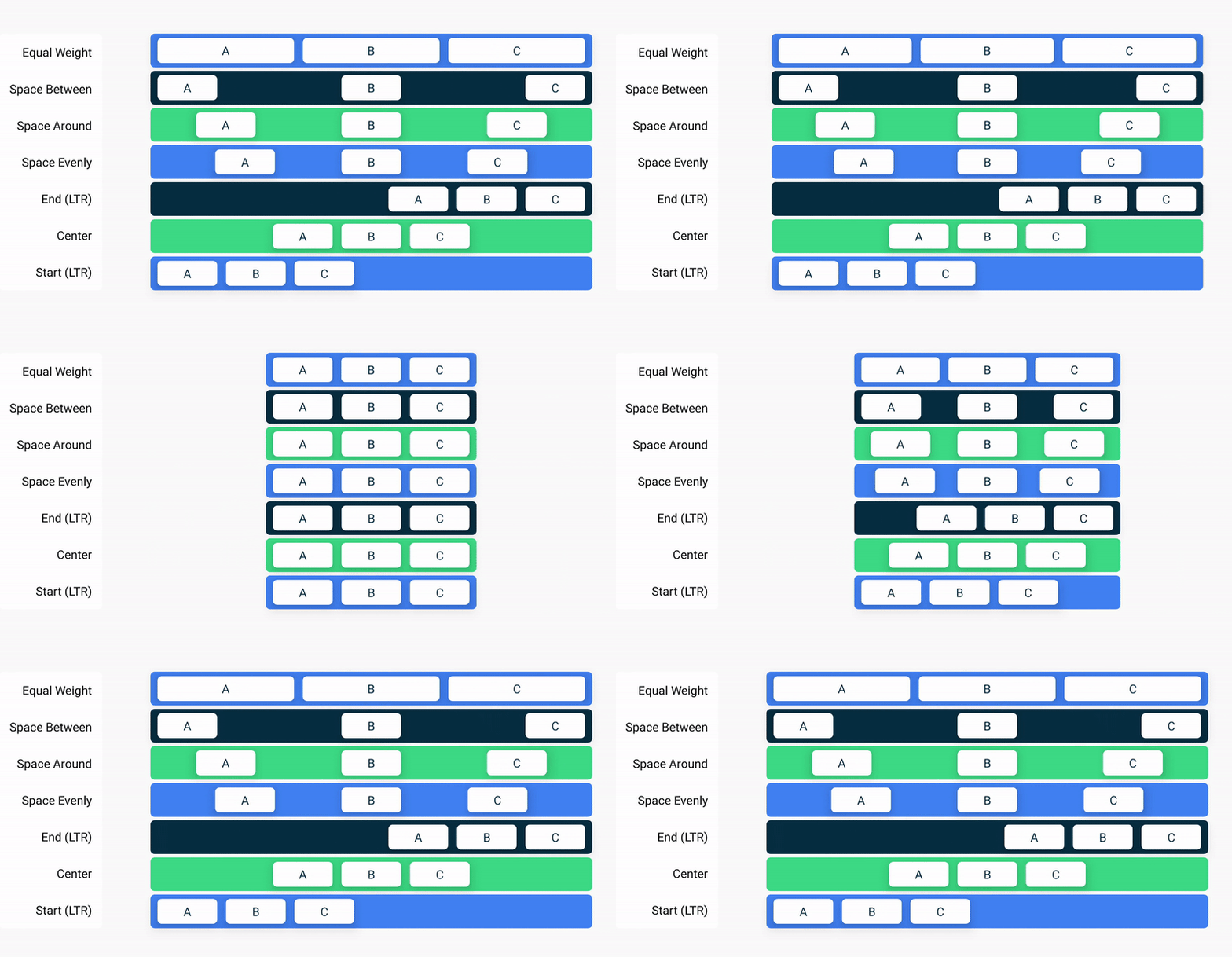
盒子布局的三个基本元素:Box,Column,Row.

  1. Column对齐属性verticalArrangement:verticalArrangement = Arrangement.X
    verticalArrangement
  2. Row对齐属性horizontalArrangement:horizontalArrangement = Arrangement.X
    verticalArrangement

2. Image

1
2
3
4
5
6
7
painterResource(R.drawable.androidparty)
Image(
painter = image,
contentDescription = null,
contentScale = ContentScale.Crop,
alpha = 0.5F
)

3. Text

1
2
3
4
5
6
7
8
9
10
11
12
13
14
15
16
17
18
19
20
21
22
23
24
// 基本属性
Text(
text = "text",
color = Color.Yellow,
fontSize = 16.sp,
fontWeight = FontWeight.Bold, // 权重
fontStyle = FontStyle.Italic, // 风格
fontFamily = FontFamily.Monospace, // 字体
textDecoration = TextDecoration.LineThrough,
letterSpacing = 20.sp, // 间距
lineHeight = 16.sp,
textAlign = TextAlign.Justify,
overflow = TextOverflow.Clip, // 溢出处理
softWrap = true, // 是否换行
maxLines = 1,
onTextLayout = {
// 布局发生变化时回调
},
modifier = Modifier
.fillMaxWidth()
.height(60.dp)
.padding(10.dp, 5.dp, 10.dp, 5.dp)
.align(alignment = Alignment.End)
)
1
2
3
4
5
6
7
8
9
10
11
12
13
14
15
// 多样式文本
Text(
buildAnnotatedString {
withStyle(ParagraphStyle()) {
append("春江潮水连海")
withStyle(SpanStyle(color = Color.Yellow)) {
append("平")
}
}
withStyle(ParagraphStyle()) {
append("海上明月共潮生")
}
append("诗歌")
}
)
1
2
3
4
5
6
7
8
9
SelectionContainer {
Text("长按可选择的文本")
}
ClickableText(
text = AnnotatedString("可点击文本"),
onClick = {

}
)

4. TextField

1
2
3
4
5
6
7
8
9
10
TextField(
label = { Text("输入框") },
value = amountInput,
onValueChange = { amountInput = it },
singleLine = true,
keyboardOptions = KeyboardOptions(
keyboardType = KeyboardType.Number,
imeAction = ImeAction.Search // 键盘端按钮设置
),
)

5. Switch

1
2
3
4
5
6
7
var isChecked by remember { mutableStateOf(true) }
Switch(
checked = isChecked,
onCheckedChange = {
isChecked = it
},
)

6. Checkbox

1
2
3
4
5
6
7
var checked by remember { mutableStateOf(true) }
Checkbox(
checked = checked,
onCheckedChange = {
checked = it
}
)

游戏基于unity3D,人物模型基于DAZ。

1. 快捷键

  • Alt + Enter:系统智能书写、更改

-

  • Ctrl + W:选中代码
  • Ctrl + Shift + W:取消选中代码
  • Shift + 方向键:选中代码

-

  • Ctrl + /:注释

-

  • Ctrl + D:复制当前行到下一行
  • Ctrl + Y:删除当前行

-

  • Alt + Shift + ↑/↓:上下移动当前行
  • Ctrl + Shift + ↑/↓:上下移动当前方法(光标于方法首)

-

  • Ctrl + -:折叠代码
  • Ctrl + Shift + -:折叠区域所有的代码
  • Ctrl + =:展开代码
  • Ctrl + Shift + =:展开区域所有的代码

-

  • Ctrl + Alt + T:用模板代码包围所选中代码块
  • Ctrl + Shift + Delete:解包模板代码

-

  • Alt + J:选中下一个匹配的字符
  • Alt + Shift + J:取消选中上一个匹配项
  • Ctrl + Alt + Shift + J:选中当前页所有匹配项

-

  • Tab:将当前词替换为提示补全词

-

  • Ctrl + Alt + Shift + T:重构菜单

-

  • Ctrl + Alt + L:格式化代码
  • Ctrl + Alt + Shift + L:显示格式化设置

-

  • Ctrl + P:查看形参信息

-

  • Ctrl + Shift + I:查看定义

-

  • F2:查看错误代码
  • Ctrl + F1:查看错误信息,再按一下显示修正示例
  • Ctrl + B:查看方法声明和引用

-

  • Ctrl + F12:查看文件结构
  • Alt + 7:打开文件结构窗口

-

  • Ctrl + E:打开最近的文件
  • Ctrl + Shift + E:打开最近的文件并显示代码

-

  • Ctrl + F10:运行
  • Ctrl + Shift + F10:创建一个临时配置并运行

v2rayA文档地址

通过Docker安装

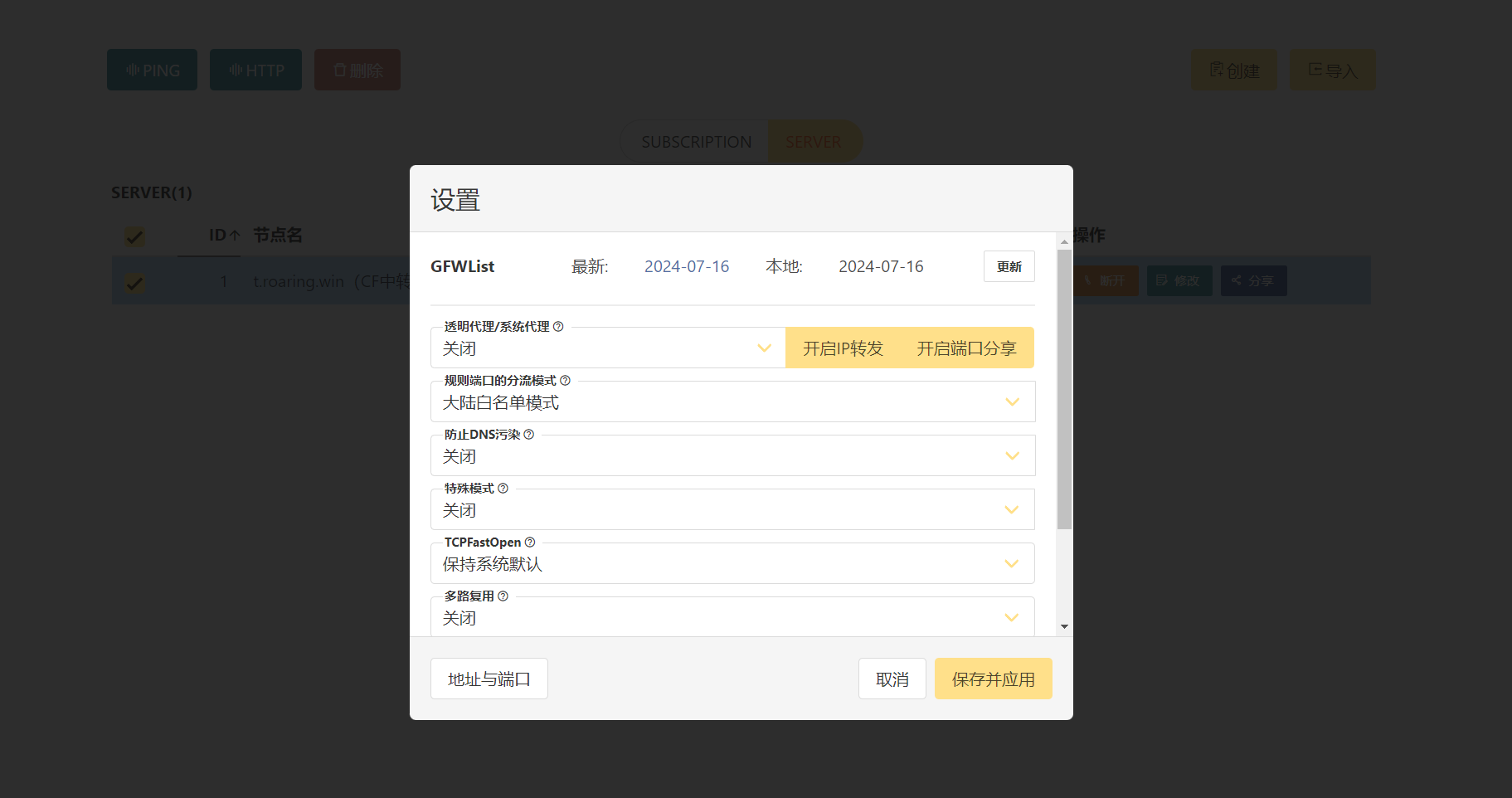
简单快捷,安装 mzz2017/v2raya 即可。
v2rayA设置

通过Linux安装

1. 创建Linux容器

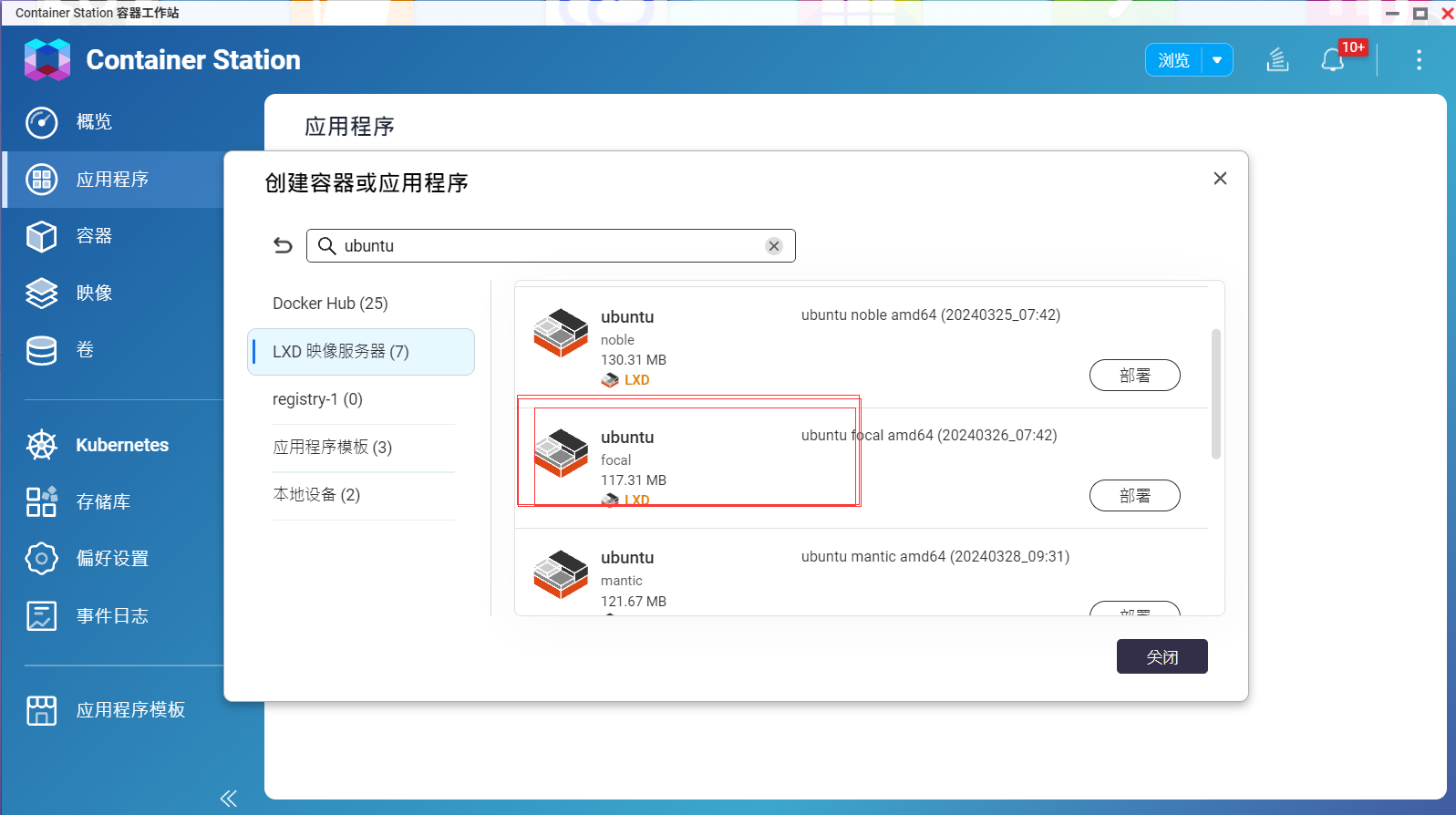
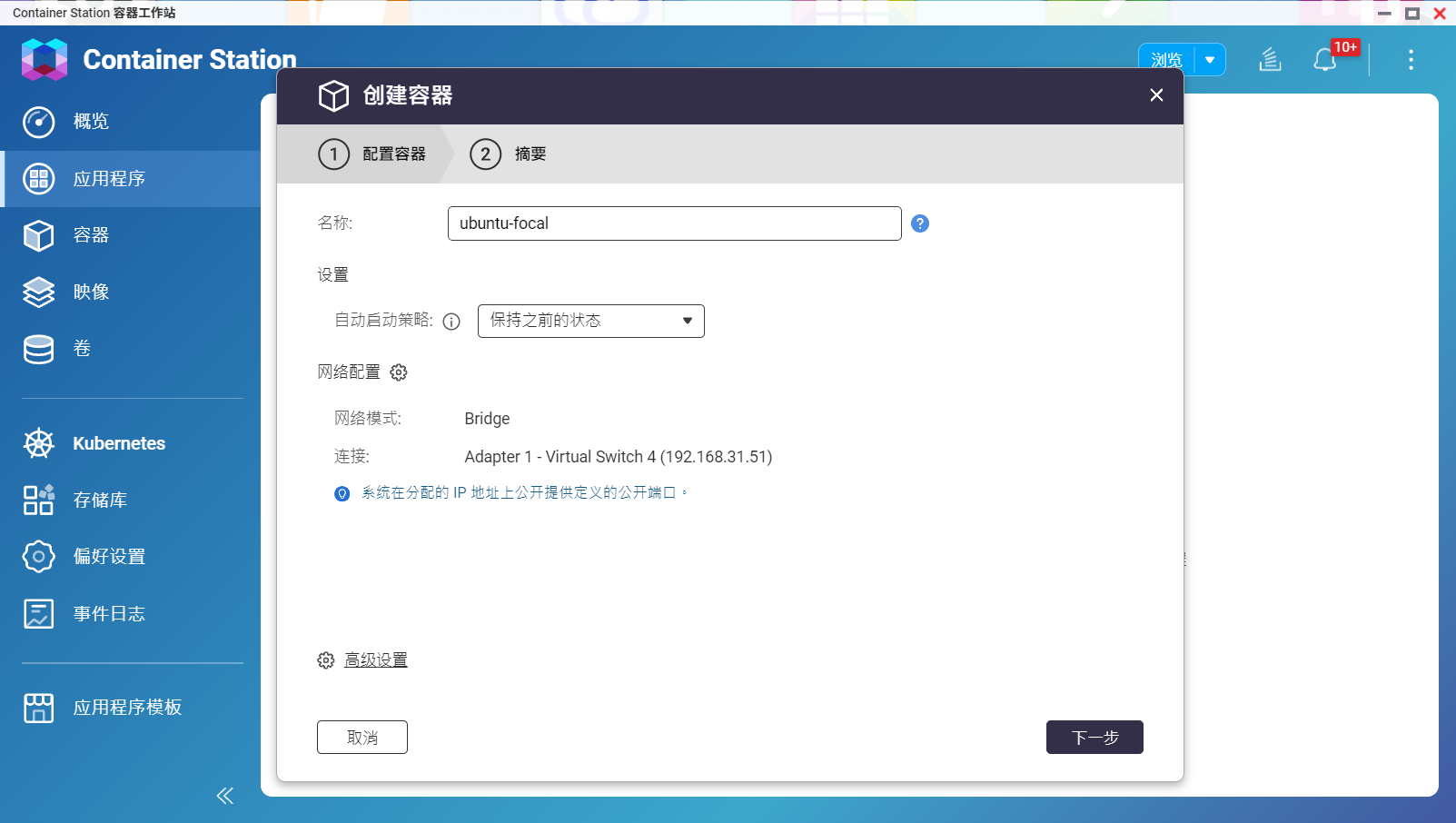
安装Container Station后,部署一个linux发行版(使用focal版本),部署时网络要选择Bridge如下:
Ubuntu-
Ubuntu-

2. 设置静态IP地址

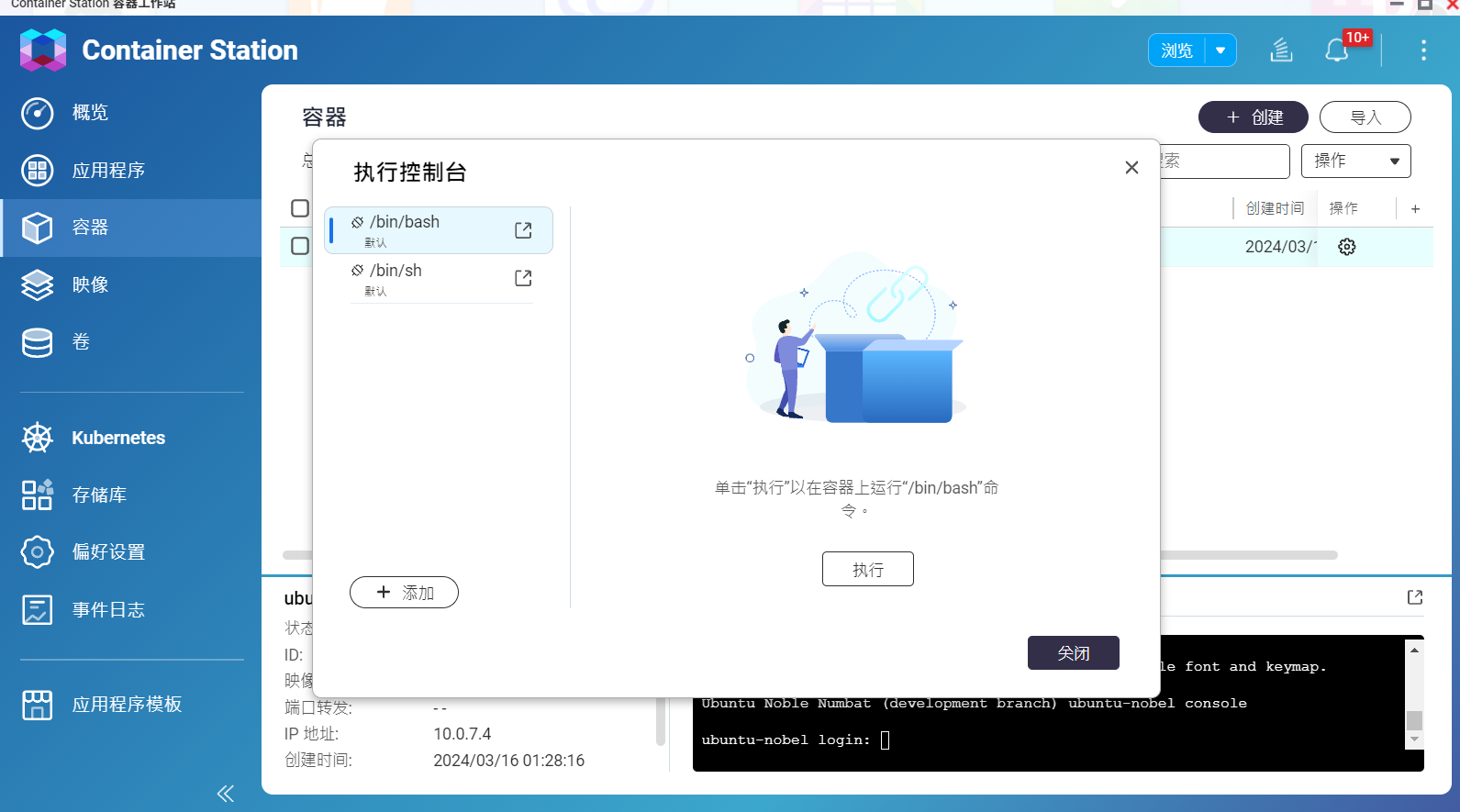
运行后,在操作处执行终端,进入shell,如下:
Ubuntu-02
Ubuntu-03
进入终端后,可输入passwd root重设root密码。
打开/etc/netplan下的配置文件,名字或有所不同。vi /etc/netplan/10-lxc.yaml

1
2
3
4
5
6
7
8
9
network:
version: 2
ethernets:
eth0:
dhcp4: false
addresses: [192.168.31.78/23] # IP地址和掩码
gateway4: 192.168.31.1 # 网关
nameservers:
addresses: [114.114.114.114, 8.8.8.8] # DNS地址

保存后,输入netplan apply应用设置。

3. 安装v2rayA

文档地址

1
2
3
4
5
6
7
8
9
10
11
12
13
14
15
16
17
18
19
20
21
sudo -i

apt update

apt install iptables

apt install curl

apt install wget

wget -qO - https://apt.v2raya.org/key/public-key.asc | sudo tee /etc/apt/trusted.gpg.d/v2raya.asc

echo "deb https://apt.v2raya.org/ v2raya main" | sudo tee /etc/apt/sources.list.d/v2raya.list

apt update

sudo apt install v2raya v2ray

systemctl start v2raya.service

systemctl enable v2raya.service

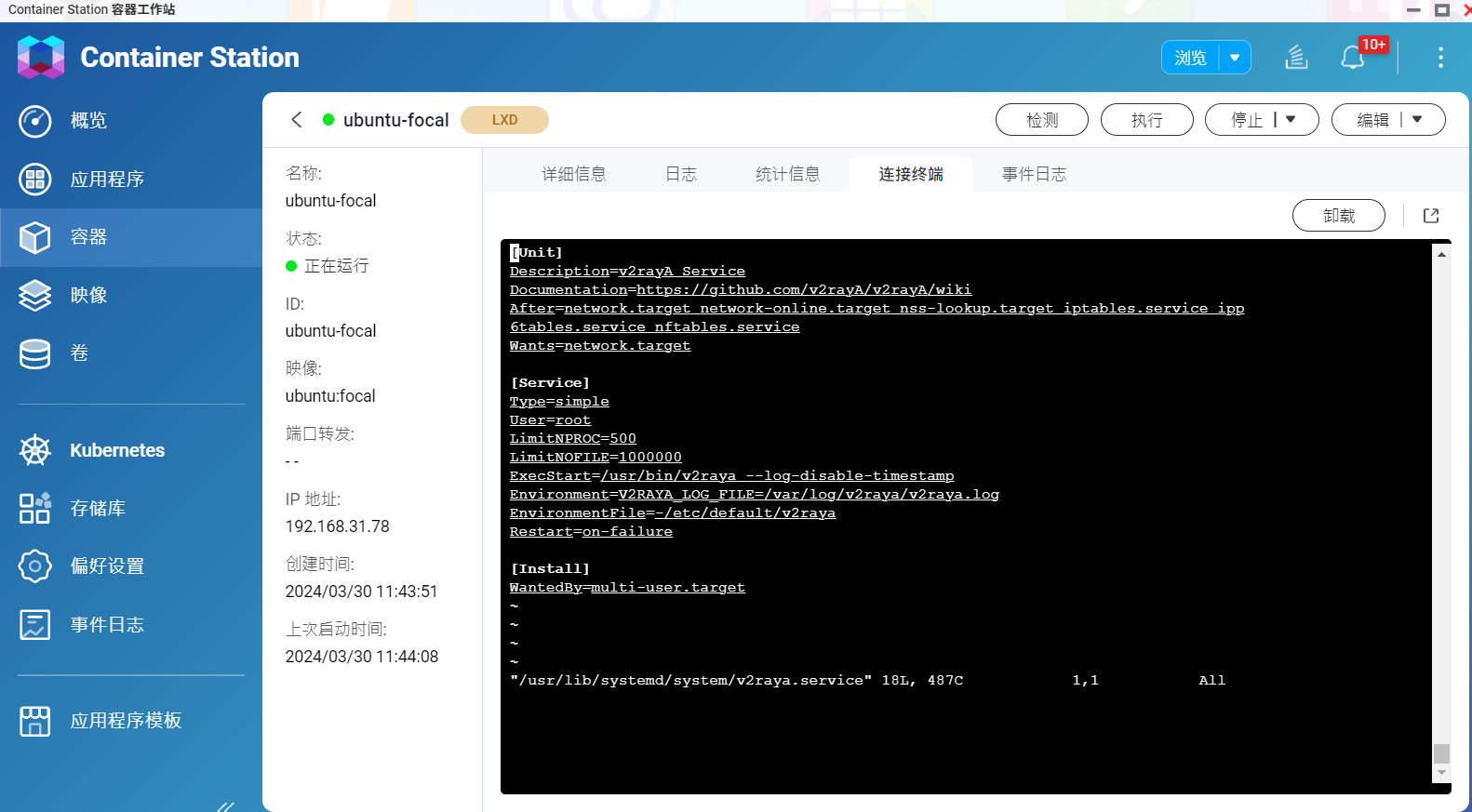
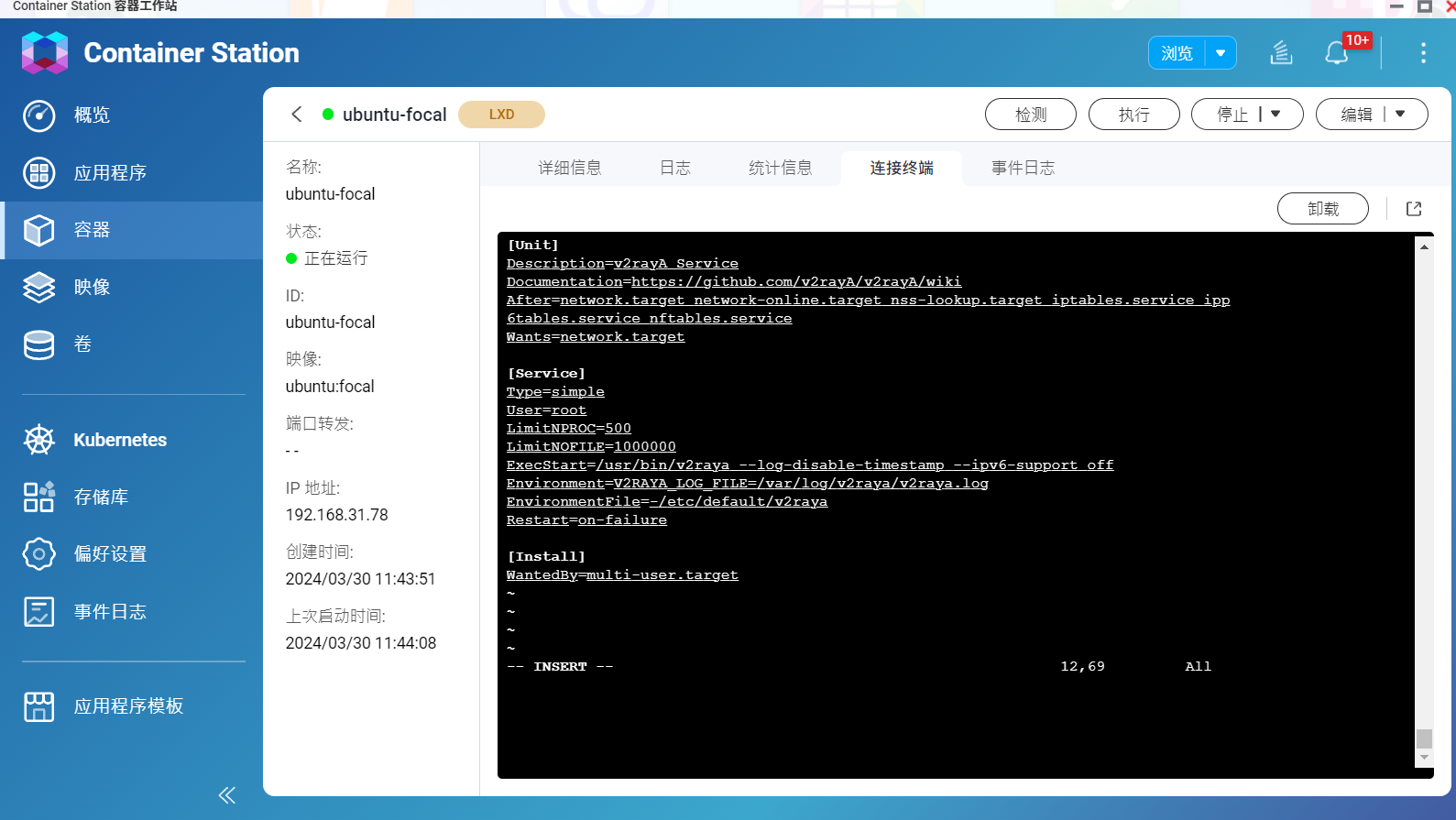
完成上述操作后,更改v2rayA启动参数,禁用IPv6。编辑v2raya.service,vi /usr/lib/systemd/system/v2raya.service。在ExecStart处添加启动参数--ipv6-support off
原:
ExecStart原
修改后:
ExecStart修改后
之后重载systemctl并且重启.systemctl daemon-reloadreboot
然后打开http://192.168.31.78:2017/,即可进行设置。
v2rayA设置

安装CUDA

1
2
3
4
5
6
7
8
9
10
11
12
13
14
15
```nvcc --version```命令查看当前CUDA版本。
然后前往[pytorch](https://pytorch.org/get-started/locally/)查看对应版本的pytorch和cuda,NVIDIA官网下载对应版本的cuda安装。

```bash
# Windows下安装
下载安装即可。
安装后,需要添加环境变量CUDA_HOME,和CUDA_PATH的值相同即可。

# Linux下安装
参考官网
# 写入环境变量:vim ~/.bashrc
export LD_LIBRARY_PATH=$LD_LIBRARY_PATH:/usr/local/cuda/lib64
export PATH=$PATH:/usr/local/cuda/bin
export CUDA_HOME=$CUDA_HOME:/usr/local/cuda
# 保存后:source ~/.bashrc

安装torch

如果有安装错误版本的cuda,先将CUDA卸载,并且将pytorch也卸载。
pip uninstall torch torchvision torchaudio

在当前python环境下安装pytorch(官网命令行,CUDA ver12.1):

1
pip install torch torchvision torchaudio --index-url https://download.pytorch.org/whl/cu121

可用以下命令检查torch是否安装成功:

1
2
3
4
python
import torch
print(torch.__version__)
print(torch.cuda.is_available())

1. 安装sshd服务
1
2
3
4
5
6
7
8
9
10
11
12
13
14
15
# 安装
sudo dnf install -y openssh-server

# 启动
sudo systemctl enable sshd

# 状态
sudo systemctl status sshd

# 重启
sudo systemctl restart sshd

# 防火墙允许
sudo firewall-cmd --permanent --add-service=ssh
sudo firewall-cmd --reload
2. 配置文件

修改配置文件相应的值,才能够进行ssh远程连接。vim /etc/ssh/sshd_config

1
2
3
4
PasswordAuthentication yes      # 开启密码登录
PermitRootLogin yes # 开启root登录
PubkeyAuthentication yes # 开启公钥登录
UsePAM yes # 启用PAM身份验证模块

修改后重启sshd服务,sudo systemctl restart sshd

地址。按官网所说安装
Caddy为golang程序,不会有各种依赖,单独的一个文件就是执行程序,cp到 /usr/local/bin就安装完成了。

输入whereis caddy可以看到 /usr/bin/caddy/etc/caddy/Caddyfile/usr/share/caddy,其中etc/caddy/Caddyfile是配置文件。编辑配置文件 vim Caddyfile

1
2
3
4
{
admin off
}
import /etc/caddy/sites/*.conf

再在 /etc/caddy 下新建 sites 文件夹,此后,将配置文件写里面即可。
配置文件 vim example.com.conf

1
2
3
4
5
6
7
8
9
10
11
12
13
14
15
16
17
18
19
20
21
22
23
24
25
26
27
28
29
30
31
32
33
34
35
36
37
38
39
40
41
42
43
44
45
46
47
48
49
50
51
52
53
54
55
56
57
58
59
60
61
62
63
64
65
66
# 不指定服务端口,或者指定了服务端口但不是80端口,则默认使用SSL,且端口为443
example.com {
root * /var/www
file_server
}


# http方式1
example.com:80 {
root * /var/www
file_server
}
# http方式2
http://example.com:xxxx {
root * /var/www
file_server
}


# 使用自定义SSL证书
example.com {
root * /var/www
tls 公钥路径 私钥路径
file_server
}


# 映射多个域名
example1.com, example2.com {
root * /var/www
file_server
}


# 反向代理
example.com {
# 1. 访问https://example.com,实际上是访问localhost:8888
reverse_proxy localhost:8888
# 2. 访问https://example.com/example,实际上是访问localhost:8888
reverse_proxy /example localhost:8888
# 3. 访问https://example.com/example,实际上是访问localhost:8888/example
reverse_proxy / localhost:8888/example/
# 4. websocket反向代理。客户端请求的wss://ws.example.com/ws,实际为wss://127.0.0.1:8888/ws
reverse_proxy /ws 127.0.0.1:8888
}


# 域名重定向1:访问example1.com会301(永久重定向),并重定向到example2.com
example1.com {
redir https://example2.com{url}
}
# 域名重定向2:访问example1.com会302(临时重定向),并重定向到example2.com
example1.com {
redir https://example2.com{url} permanent
}


# 负载均衡
example.com {
reverse_proxy localhost:x localhost:y {
lb_policy first
}
}


# 跨域访问

一个比较全面的caddy配置文件:

1
2
3
4
5
6
7
8
9
10
11
12
13
14
15
16
17
18
19
20
21
22
example.com {
# gzip压缩,提高访问速度
gzip
# 允许浏览站点目录,不填默认禁止
browse
# 日志存放地址
log /etc/caddy/log/access.log
# 反向代理
revers_proxy localhost:xxxx {

}
errors {
log /etc/caddy/log/error.log {
# 大于50m,则自动分割
size 50
# 最多保留30天
age 30
# 最多保存5个文件
keep 5
}
}
}

修改配置后,systemctl reload caddy重加载配置。
v2rayA文档地址

通过Docker安装

简单快捷,安装 mzz2017/v2raya 即可。
v2rayA设置

通过Linux安装

1. 创建Linux容器

安装Container Station后,部署一个linux发行版(使用focal版本),部署时网络要选择Bridge如下:
Ubuntu-
Ubuntu-

2. 设置静态IP地址

运行后,在操作处执行终端,进入shell,如下:
Ubuntu-02
Ubuntu-03
进入终端后,可输入passwd root重设root密码。
打开/etc/netplan下的配置文件,名字或有所不同。vi /etc/netplan/10-lxc.yaml

1
2
3
4
5
6
7
8
9
network:
version: 2
ethernets:
eth0:
dhcp4: false
addresses: [192.168.31.78/23] # IP地址和掩码
gateway4: 192.168.31.1 # 网关
nameservers:
addresses: [114.114.114.114, 8.8.8.8] # DNS地址

保存后,输入netplan apply应用设置。

3. 安装v2rayA

文档地址

1
2
3
4
5
6
7
8
9
10
11
12
13
14
15
16
17
18
19
20
21
sudo -i

apt update

apt install iptables

apt install curl

apt install wget

wget -qO - https://apt.v2raya.org/key/public-key.asc | sudo tee /etc/apt/trusted.gpg.d/v2raya.asc

echo "deb https://apt.v2raya.org/ v2raya main" | sudo tee /etc/apt/sources.list.d/v2raya.list

apt update

sudo apt install v2raya v2ray

systemctl start v2raya.service

systemctl enable v2raya.service

完成上述操作后,更改v2rayA启动参数,禁用IPv6。编辑v2raya.service,vi /usr/lib/systemd/system/v2raya.service。在ExecStart处添加启动参数--ipv6-support off
原:
ExecStart原
修改后:
ExecStart修改后
之后重载systemctl并且重启.systemctl daemon-reloadreboot
然后打开http://192.168.31.78:2017/,即可进行设置。
v2rayA设置

目前是vue3
按照文档在预定目录下进行项目创建即可。npm create vue@latest。如果提示网路错误,则需要设置npm镜像源或者设置npm代理。

地址

1. 服务端

  1. 配置 vim /usr/lib/systemd/system/frps.service,实现设置systemctl 管理。类似可配置frpc.service。
    frps.service(vim /usr/lib/systemd/system/frps.service):
    1
    2
    3
    4
    5
    6
    7
    8
    9
    10
    11
    12
    13
    [Unit]
    Description=Frps Server Service
    After=network.target

    [Service]
    Type=simple
    User=nobody
    Restart=on-failure
    RestartSec=5s
    ExecStart=/home/frp/frps -c /home/frp/frps.toml

    [Install]
    WantedBy=multi-user.target
    frpc.service(vim /usr/lib/systemd/system/frpc.service):
    1
    2
    3
    4
    5
    6
    7
    8
    9
    10
    11
    12
    13
    [Unit]
    Description=Frpc Server Service
    After=network.target

    [Service]
    Type=simple
    User=nobody
    Restart=on-failure
    RestartSec=5s
    ExecStart=/home/frp/frpc -c /home/frp/frpc.toml

    [Install]
    WantedBy=multi-user.target
  2. 下载相应版本的frp(下载到home文件夹内)
    1
    wget https://github.com/fatedier/frp/releases/download/v0.54.0/frp_0.54.0_linux_amd64.tar.gz
  3. 解压&复制&给予权限
    1
    2
    3
    4
    5
    tar -xzvf frp_0.54.0_linux_amd64.tar.gz
    cp -r frp_0.54.0_linux_amd64 frp

    # 给予权限
    chmod -R 777 frp
  4. 进入frp文件夹,编辑frps.toml,vim frps.toml
    1
    2
    3
    4
    5
    6
    7
    8
    9
    10
    11
    12
    13
    14
    15
    16
    17
    18
    19
    20
    21
    22
    23
    24
    # frp服务器端口,防火墙需要开放
    bindPort = 14000
    # 自定义监听端口,所有对该端口的访问将被转发到本地内网,配合反向代理可不做防火墙放行
    vhostHTTPPort = 14001
    vhostHTTPSPort = 14002
    # QUIC 绑定的是 UDP 端口,可以和 bindPort 一样
    quicBindPort = 14003
    # 认证token,frpc/frps通信认证
    auth.token = "psw"
    # 是否启用端口复用
    transport.tls.disableCustomTLSFirstByte = false

    # 日志输出文件路径
    log.to = "slog"
    # 日志文件最多保留天数
    log.maxDays = 7

    # 服务端监听面板
    webServer.addr = "0.0.0.0"
    webServer.port = 14004
    webServer.user = "admin"
    webServer.password = "psw"
    #webServer.tls.certFile = "Your server.crt"
    #webServer.tls.keyFile = "Your server.key"
  5. 启动&添加到开机自启动
    1
    2
    3
    4
    5
    6
    7
    8
    9
    10
    11
    12
    # 启动
    sudo systemctl start frps
    sudo systemctl start frpc
    # 重启
    sudo systemctl restart frps
    sudo systemctl restart frpc
    # 添加到开机自启动
    systemctl enable frps
    systemctl enable frpc
    # 查看状态
    systemctl status frps
    systemctl status frpc

    2. 配置NGINX

    实现反向代理,vim /etc/nginx/conf.d/frp.domain.com.conf
    1
    2
    3
    4
    5
    6
    7
    8
    9
    10
    11
    12
    13
    14
    15
    16
    17
    18
    19
    20
    21
    22
    23
    24
    25
    26
    27
    28
    29
    30
    31
    32
    33
    34
    35
    36
    37
    38
    39
    40
    41
    42
    43
    44
    45
    46
    47
    48
    49
    50
    51
    52
    53
    54
    55
    56
    57
    58
    59
    60
    # 服务端监听面板
    server {
    listen 443 ssl;
    server_name frpi.domain.com; # 域名
    ssl_certificate /home/certs/domain.com.pem; # ssl路径
    ssl_certificate_key /home/certs/domain.com.key; # ssl路径
    # 其他ssl设置
    ssl_protocols TLSv1 TLSv1.1 TLSv1.2;
    ssl_ciphers EECDH+CHACHA20:EECDH+AES128:RSA+AES128:EECDH+AES256:RSA+AES256:EECDH+3DES:RSA+3DES:!MD5;
    ssl_prefer_server_ciphers on;
    ssl_session_timeout 10m;
    ssl_session_cache builtin:1000 shared:SSL:10m;
    ssl_buffer_size 1400;
    add_header Strict-Transport-Security max-age=15768000;
    ssl_stapling on;
    ssl_stapling_verify on;
    # access_log /etc/nginx/conf.d/logs/example.com.log combined;

    location / {
    proxy_pass http://localhost:14004; # 代理的服务端口
    proxy_set_header Host $host;
    proxy_set_header X-Real-IP $remote_addr;
    proxy_set_header X-Forwarded-For $proxy_add_x_forwarded_for;
    proxy_set_header X-Forwarded-Proto $scheme;
    }
    }
    server {
    listen 80;
    server_name frpi.domain.com; # HTTP重定向到HTTPS
    return 301 https://$server_name$request_uri;
    }

    # frp服务端口代理
    server {
    listen 80;
    listen [::]:80;
    server_name frps.domain.com;

    location / {
    proxy_pass http://localhost:14000; # 将流量发送到应用程序所在的端口
    proxy_set_header Host $host;
    proxy_set_header X-Real-IP $remote_addr;
    proxy_set_header X-Forwarded-For $proxy_add_x_forwarded_for;
    proxy_set_header X-Forwarded-Proto $scheme;
    }
    }

    # 穿透的服务端口
    server {
    listen 80;
    server_name *.frp.domain.com;

    location / {
    proxy_pass http://localhost:14001; # 将流量发送到应用程序所在的端口
    proxy_set_header Host $host;
    proxy_set_header X-Real-IP $remote_addr;
    proxy_set_header X-Forwarded-For $proxy_add_x_forwarded_for;
    proxy_set_header X-Forwarded-Proto $scheme;
    }
    }
    重启nginx,sudo systemctl restart nginx。至此,服务端配置完毕。

3. 客户端

编写frpc.toml

1
2
3
4
5
6
7
8
9
10
11
12
13
14
15
16
17
18
19
20
21
22
23
24
25
26
27
28
29
30
31
32
33
34
35
36
37
38
39
40
41
42
43
44
45
46
47
48
49
50
51
52
53
54
55
56
57
58
59
60
61
62
# 远程服务器地址,支持域名和ip
serverAddr = "xxx.xxx.xxx.xx"
# 远程服务器监听端口,可以配合nginx反向代理实现去端口
serverPort = 14000
# 启用quic协议
#transport.protocol = "quic"
#quicBindPort = 14003
# 认证token,frpc/frps通信认证
auth.token = "password"
# 启用端口复用
transport.tls.disableCustomTLSFirstByte = false

# 客户端面板
webServer.addr = "127.0.0.1"
webServer.port = 14004
webServer.user = "user"
webServer.password = "password"

# 日志输出文件路径
log.to = "clog"
# 日志文件最多保留天数
log.maxDays = 7

# 以上为frpc固定项配置

[[proxies]]
name = "web"
type = "http"
localIP = "127.0.0.1"
localPort = 8888
customDomains = ["xx.frp.domains.com"]

# 需要增加本地服务的话,增加 proxies 配置和子域名即可

# 相对完整的代理示例,一般情况下http代理只需要填写到 customDomains 即可
# [[proxies]]
# name = "web"
# type = "http"
# localPort = 80
# customDomains = ["www.domains.com"]

# # 代理负载均衡,相同groupKey的代理,会视为负载均衡
# # 对于 tcp 类型代理,需要确保 groupKey 相同以进行权限验证,同时 remotePort 也需一致。
# # 对于 http 类型代理,需要保证 groupKey, customDomains(自定义域名),subdomain 和 locations 相同。
# loadBalancer.group = "web"
# loadBalancer.groupKey = "123"

# # 启用健康检查,类型为 http
# healthCheck.type = "http"
# # 健康检查发送 http 请求的 path,后端服务需要返回 2xx 的 http 状态码
# healthCheck.path = "/status"
# # 建立连接超时时间为 3 秒
# healthCheck.timeoutSeconds = 3
# # 连续 3 次检查失败,此 proxy 会被摘除
# healthCheck.maxFailed = 3
# # 每隔 10 秒进行一次健康检查
# healthCheck.intervalSeconds = 10

# # 获取用户真实IP,具体配置见 https://gofrp.org/zh-cn/docs/features/common/realip/
# transport.proxyProtocolVersion = "v2"
# # 带宽限速,支持MB,KB
# transport.bandwidthLimit = "1MB"

启动:./frpc -c ./frpc.toml

服务器端设置好反向代理、域名供应商处设置好子域名后,即可用xx.frp.domains.com访问本地服务。

4. 加密的SSH链接

按前设置好frp服务器端。然后分别在两台计算机上(A、B,假设要从B访问A)设置好frp客户端,即可进行SSH连接。

  1. 计算机A(目标计算机)

    1
    2
    3
    4
    5
    6
    7
    # frpc.toml
    [[proxies]]
    name = "xx_secret_ssh"
    type = "stcp"
    secretKey = "psw"
    localIP = "127.0.0.1"
    localPort = 22

    在计算机A上启动frpc服务,./frpc -c ./frpc.toml

  2. 计算机B

    1
    2
    3
    4
    5
    6
    7
    [[visitors]]
    name = "xx_ssh_visitor"
    type = "stcp"
    serverName = "xx_secret_ssh"
    secretKey = "psw"
    bindAddr = "127.0.0.1"
    bindPort = 6000

    在计算机B启动frpc服务,./frpc -c ./frpc.toml

设置完毕,在计算机B上可通过ssh -oPort=6000 root@127.0.0.1连接计算机A。

5. 数据库穿透

数据库所在计算机配置:

1
2
3
4
5
6
7
8
# 3306为数据库服务所在端口
# frps服务器计算机开放13306端口
[[proxies]]
name = "mariadb"
type = "tcp"
localIP = "127.0.0.1"
localPort = 3306
remotePort = 13306

则可在任何地方,以frps服务器计算机ip:13306访问数据库。